Sealed at decision time
Each row carries the policy version, the matched rule, the approver (if any), the timestamp, and the outcome. No edits, no retroactive justifications.
ifivo is the runtime control plane for AI agents. See what they do, approve what matters, and stop them instantly, with audit-grade logs across every tool, API, and payment rail.
Runtime guardrails, not content filters — here’s the difference.
curl -X POST https://www.ifivo.com/api/gateway/actions \
  -H "content-type: application/json" \
  -d '{
    "agent_api_key": "sk_live_…",
    "vendor": "stripe",
    "action": "refund",
    "amount_cents": 22000,
    "risk_score": 0.55
  }'
# → { "decision": { "outcome": "pending_approval",
# "reason": "Refunds over $150 require approval" } }/api/gateway/actions runs in the public simulator.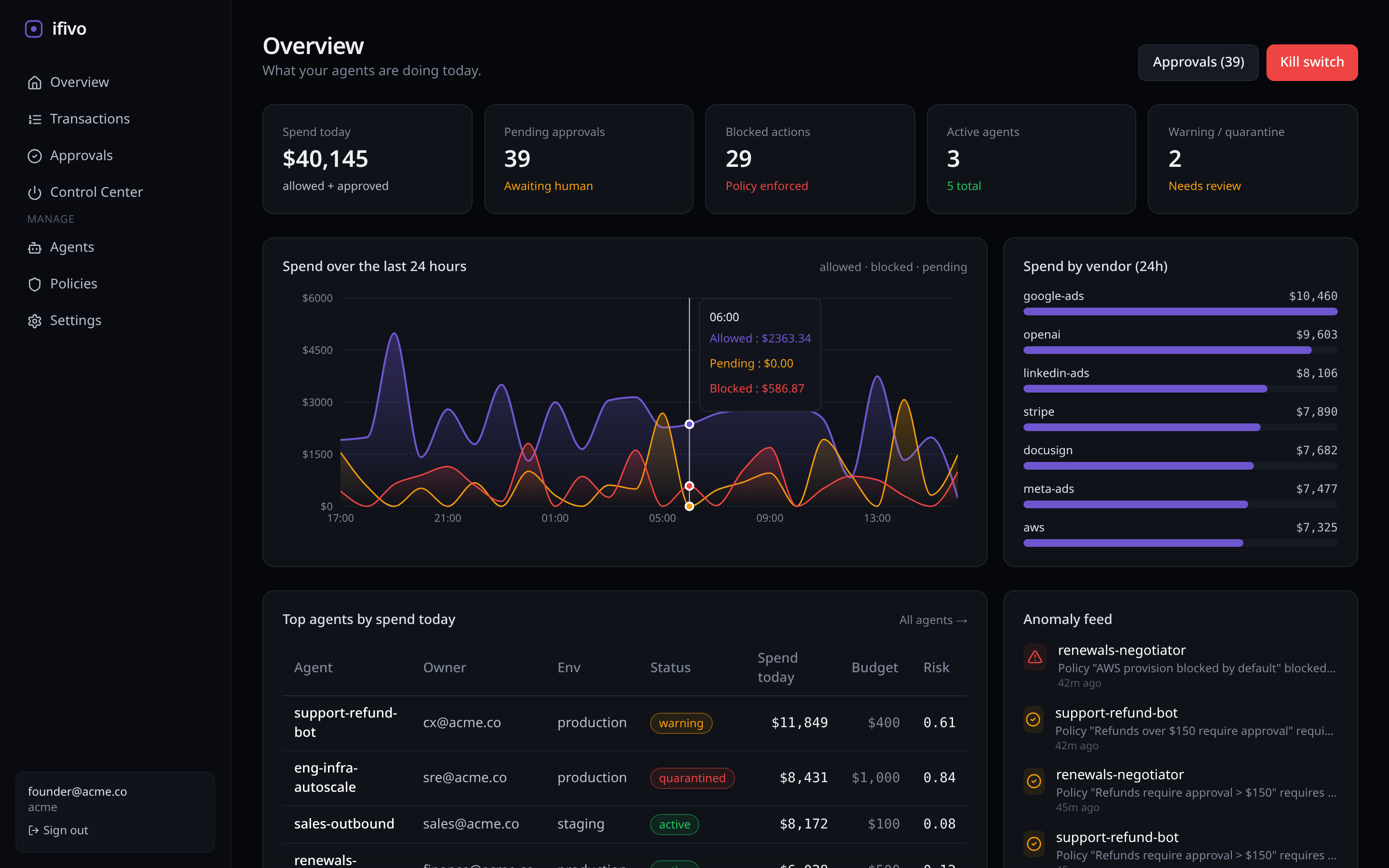
Every entry is a real public deprecation, retirement, or pricing change pulled from the vendor’s own documentation. ifivo treats these as policy signals: agents calling a deprecated endpoint can be paused, alerted, or surfaced for review before the change date lands.
No vendor partnerships are implied. Sources link to the official public notice for each event.
public · 60s edge cache · CORS *gpt-4o-realtime-previewOpenAI gpt-4o-realtime-preview retires; migrate to a successor realtime model.
Vendor sourceclaude-sonnet-4-20250514Anthropic claude-sonnet-4-20250514 deprecated; plan migration window.
Vendor sourcegpt-4o-2024-05-13Azure OpenAI gpt-4o-2024-05-13 retires from Standard deployment.
Vendor sourcegemini-3-pro-previewGoogle Gemini gemini-3-pro-preview is shut down.
Vendor sourcemessaging/t-mobile-10dlc-carrier-feesT-Mobile 10DLC carrier-fee changes flow through Twilio Messaging.
Vendor sourceapps/classicSlack classic apps sunset; migrate to Slack's modern apps platform.
Vendor sourceThe same rows you see above are exposed at /api/vendor-health/feed. No auth, no rate-limit keys, 60-second edge cache, CORS open. Wire it into your CI, your agent registry, or a Slack digest.
?vendor=openai — filter by vendor slug?kind=model_retirement — filter by event kind?since=2026-01-01 — only changes after a date?include=candidate — opt into the watchlist# Live verified events
curl https://www.ifivo.com/api/vendor-health/feed
# Filter by vendor
curl 'https://www.ifivo.com/api/vendor-health/feed?vendor=openai'
# Watchlist (verified + candidate)
curl 'https://www.ifivo.com/api/vendor-health/feed?include=candidate'{
"version": 1,
"generated_at": "2026-05-04T...",
"source": "db" | "fallback",
"events": [{
"vendor": "openai",
"event_kind": "model_retirement",
"identifier": "gpt-4-32k",
"state": "verified",
"effective_at": "2025-06-06",
"announced_at": "2024-06-06",
"superseded_by": "gpt-4o",
"impact_summary": "...",
"recommended_action": "...",
"source_url": "https://platform.openai.com/..."
}]
}Sunset Radar is verified-only by default. Candidate events live in a separate watchlist behind ?include=candidate. Schema and verification process are public.
The audit sink, policy runtime, and Microsoft Agent Framework middleware adapter ship as MIT-licensed npm packages. Run them against a local JSONL file with zero network dependency. Connect an ifivo API key when you want approvals, the kill switch, or the immutable ledger.
Microsoft Agent Framework provides middleware hooks; governance implementation remains the responsibility of the application team. We are not a Microsoft partner.
p50 ≤ 50 ms · p95 ≤ 120 ms · canonical SLO@ifivo/mcp-serverDrop-in MCP adapter with policy + audit
@ifivo/maf-middlewareMicrosoft Agent Framework middleware
@ifivo/audit-cliReplay your audit log offline
# Local-only by default. Records every tool call to ./.ifivo/audit.jsonl.
npm install -g @ifivo/mcp-server
ifivo --help

# Wrap your existing MCP server. Audit + policy run as a sidecar, no SaaS.
ifivo wrap --policy ./policies.yaml -- node my-mcp-server.jsSee the money, approve the risky moves, and shut it all down instantly. ifivo turns scattered agent logs into an operational control plane your security, finance, and engineering teams actually use.
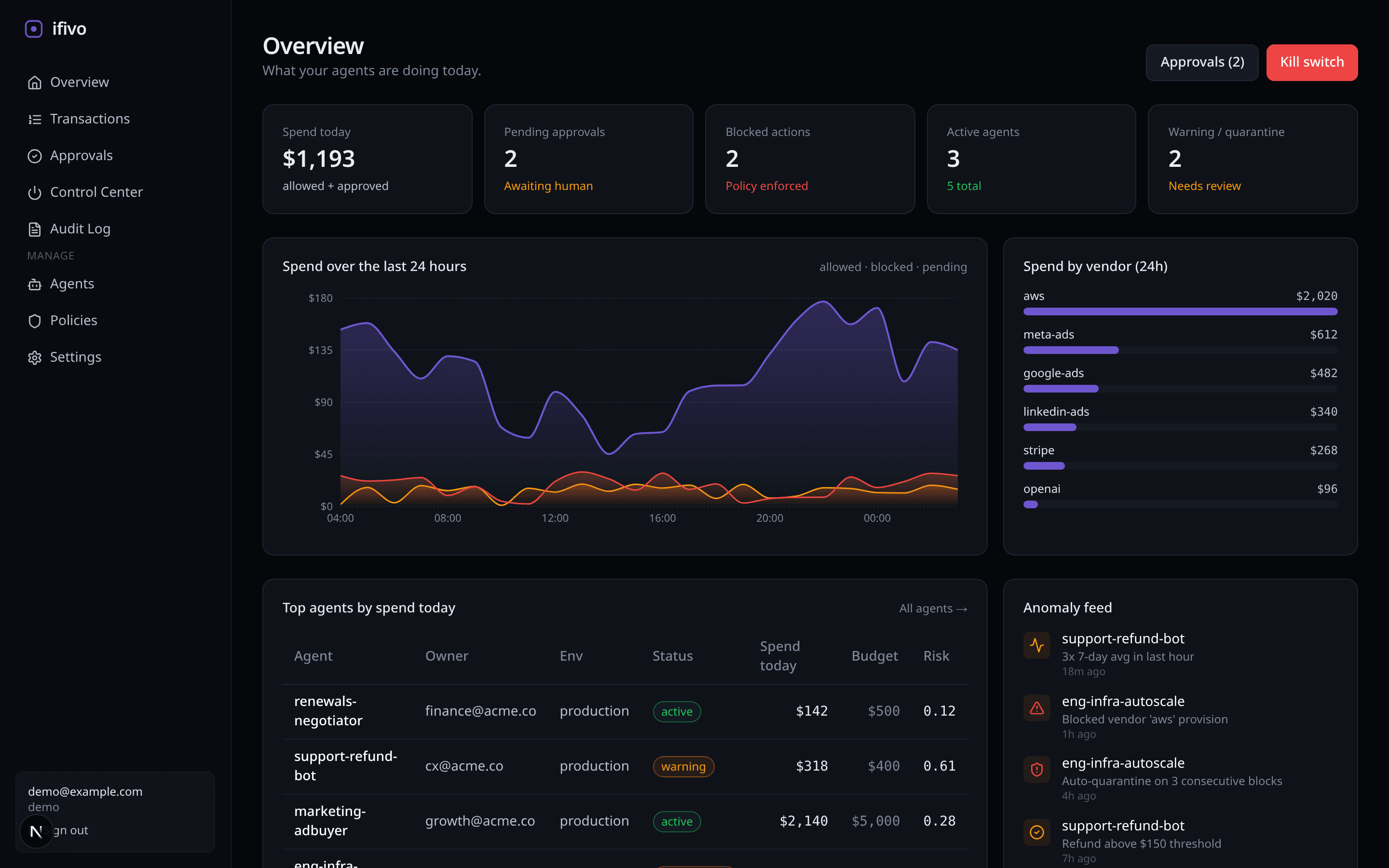
Daily spend, pending approvals, blocked actions, and active agents, all at a glance.
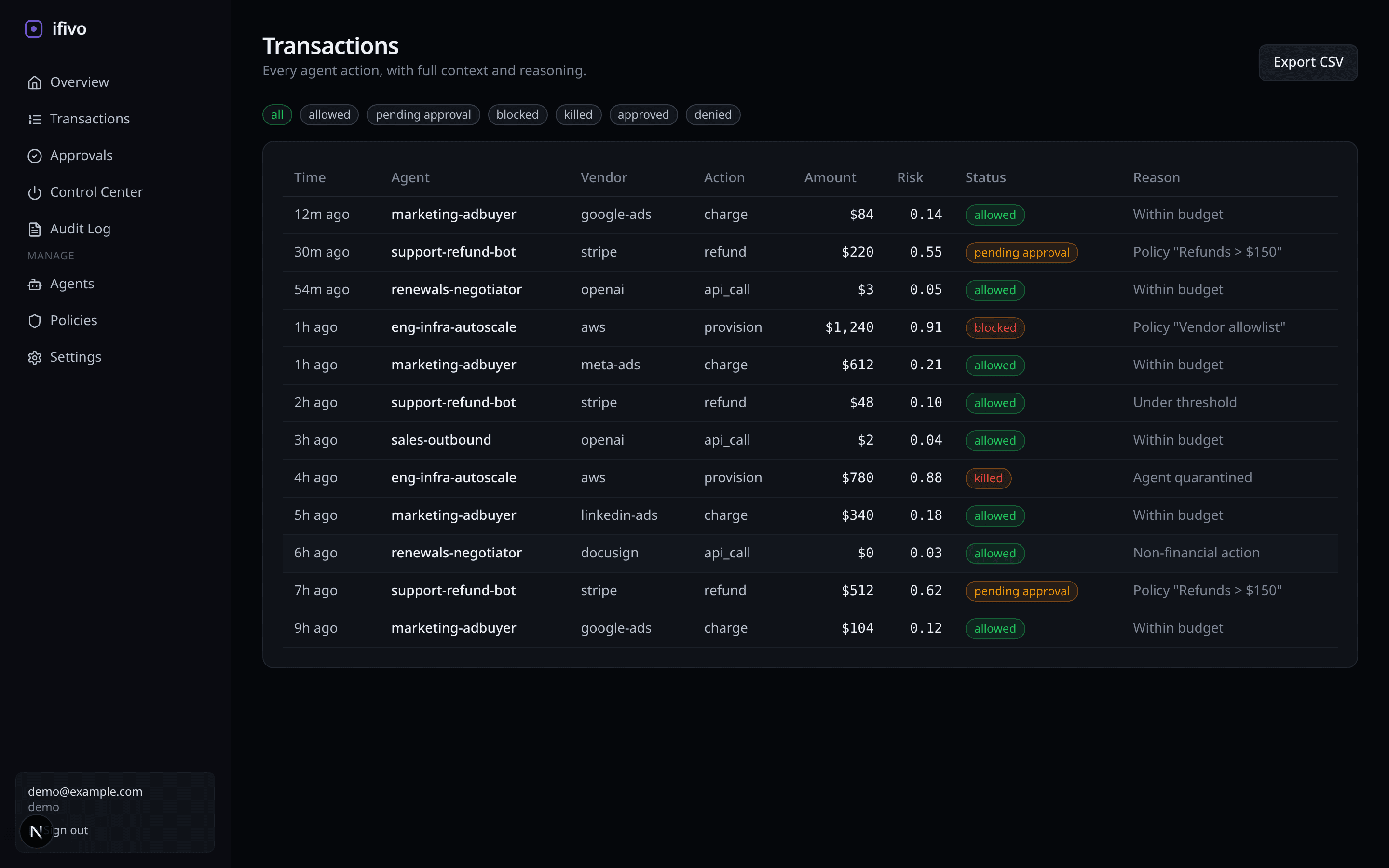
Every agent action, filterable by vendor, policy, or risk. Full context included.
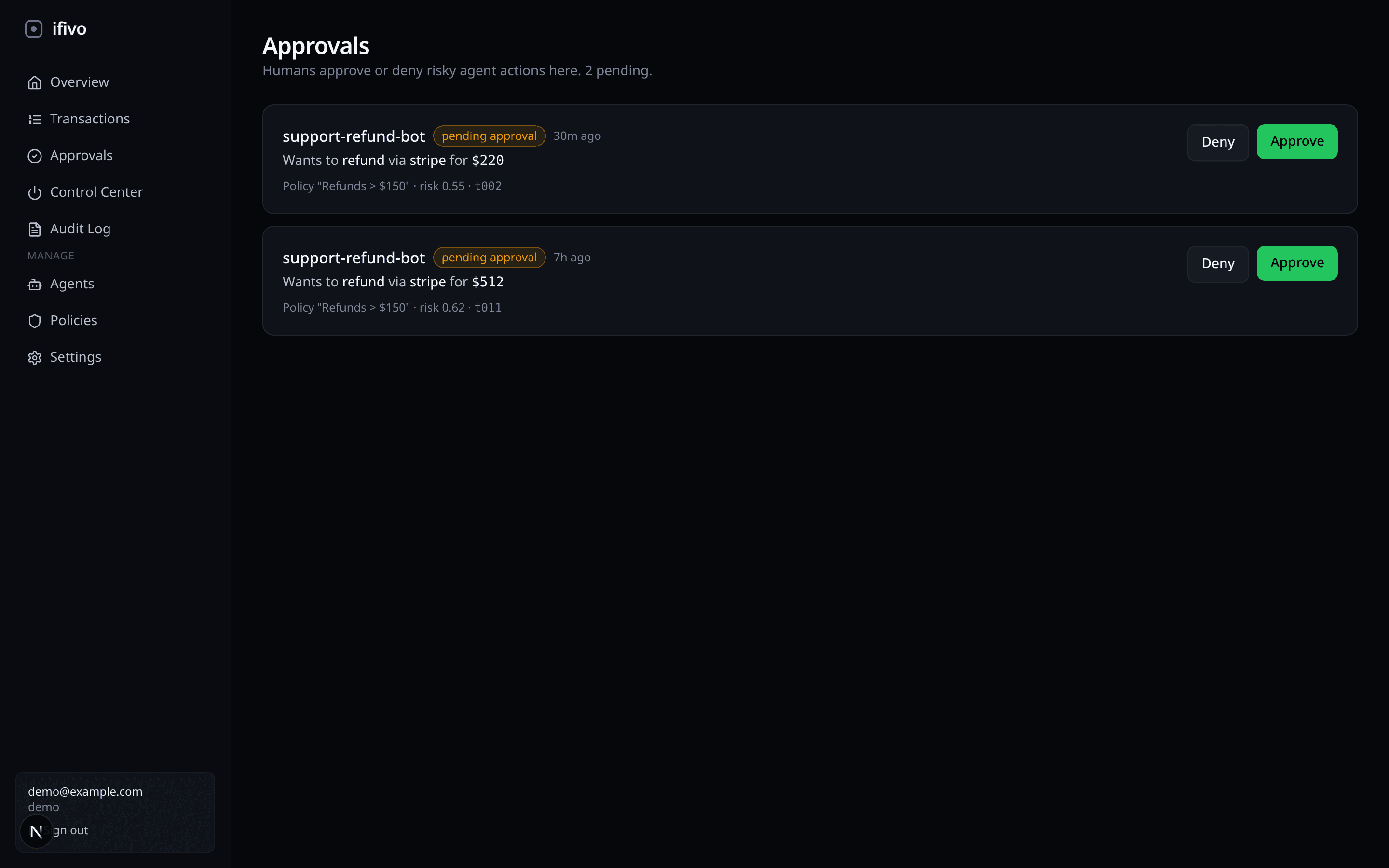
Humans approve or deny high-risk moves from a single queue, or from Slack.
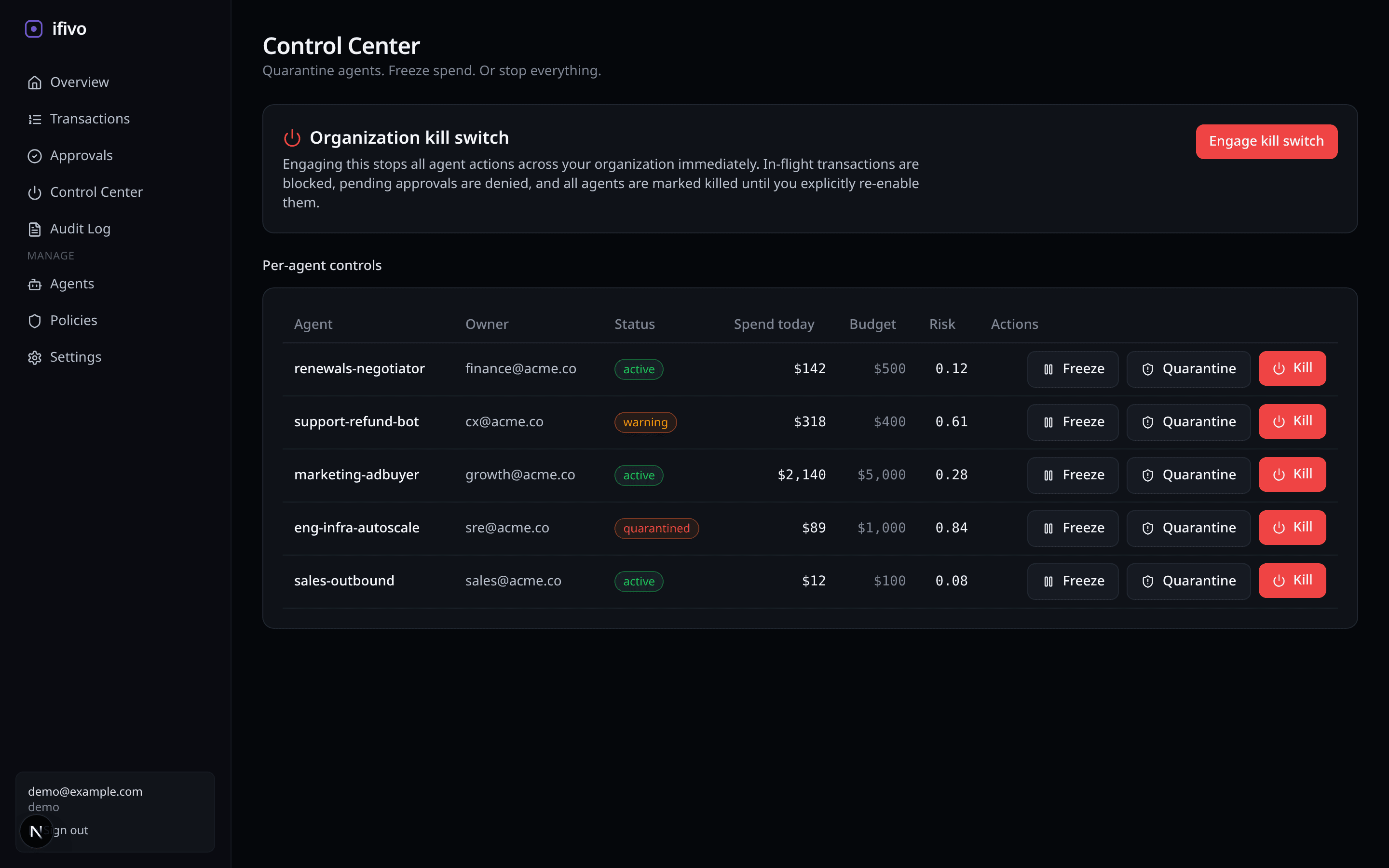
Quarantine an agent. Freeze a budget. Or hit the org-wide kill switch.
Route agent actions through ifivo. Every call and payment attempt is logged with identity, intent, and risk.
Define budgets, vendor allowlists, and risk thresholds. Deterministic rules run at the edge. No LLM required.
Send anything above threshold to a human. Approve in-app, Slack, email, or signed webhooks to PagerDuty/Opsgenie/Twilio. Full diff of what the agent intended.
Quarantine an agent, freeze spend, or pull the org-wide kill switch. Authority is always revocable.
Most teams turn shadow mode on to de-risk the first rollout. The strongest governance programs keep it on — running every proposed policy change against real traffic before it goes live. Shadow and live run side by side, forever if you want. No surprise incidents at 2 a.m.
shadow: false. 82 would-be approvals will start going to the approvals queue.For every agent action that touches money, data, or a customer: what was requested, which policy version ran, who approved or overrode, what executed, what happened next. Immutable, replayable, and queryable. When an auditor, a CISO, or your board asks why an agent was allowed to do something, the answer is already written down.
Each row carries the policy version, the matched rule, the approver (if any), the timestamp, and the outcome. No edits, no retroactive justifications.
When a human reaches past policy, the override is captured with reason code and free-text justification — not buried in a comment.
Every proposed policy change leaves a shadow decision next to the live one. Filter on the diff to see exactly which actions would have changed.
SIEM, S3, CSV, or a signed archive for an audit. Your evidence, exportable at any time. Lock-in is the record, not the contract.
Upload your OpenAI logs or a generic JSONL. We replay every action against a curated policy pack and show you exactly which refunds, sends, and tool calls would have been blocked, paused for approval, or flagged as prompt-injection signal. No signup, auto-deletes in 30 days.
Start free. Upgrade when your agents touch real money.
For early pilots
For production agents
For regulated orgs
Observability tools watch. Vendor limits react. Homegrown code drifts. ifivo is the control plane, and it runs before the action does.
| Capability | ifivo Runtime control plane | Homegrown gateway Internal middleware | LLM observability Traces & logs | Vendor-native limits Per-tool rules |
|---|---|---|---|---|
Deterministic policy enforcement Budgets, allowlists, thresholds evaluated before the action runs. | ||||
Human-in-the-loop approvals Slack, email, or in-app. With a full diff of what the agent intended. | ||||
Cross-tool view (LLM + API + payment rail) | ||||
Instant kill switch (per-agent, org-wide) | ||||
Shadow mode before enforcement Observe traffic for a week, then turn rules on with confidence. | ||||
Immutable, exportable audit log Hash-chained records, SIEM-ready export. | ||||
Non-custodial (no agent credentials stored) | ||||
Runs in under an hour |
Partial means it is possible but not turnkey. Our take, based on what teams tell us during onboarding.
blocked from the gateway until a human releases it. Individual agents can also be quarantined without touching the org-wide switch.Route one action through ifivo, flip the kill switch, and watch the audit log fill in. Free plan covers the first thousand actions a month.
No card. No commit. Non-custodial by default.